
The UDISE Plus Student Module is one of the most important components of the UDISE+ (Unified District Information System for Education Plus) portal. It focuses specifically on collecting, updating, and managing student-level data across schools in India. This module plays a crucial role in strengthening data accuracy, improving educational planning, and supporting evidence-based policy decisions.
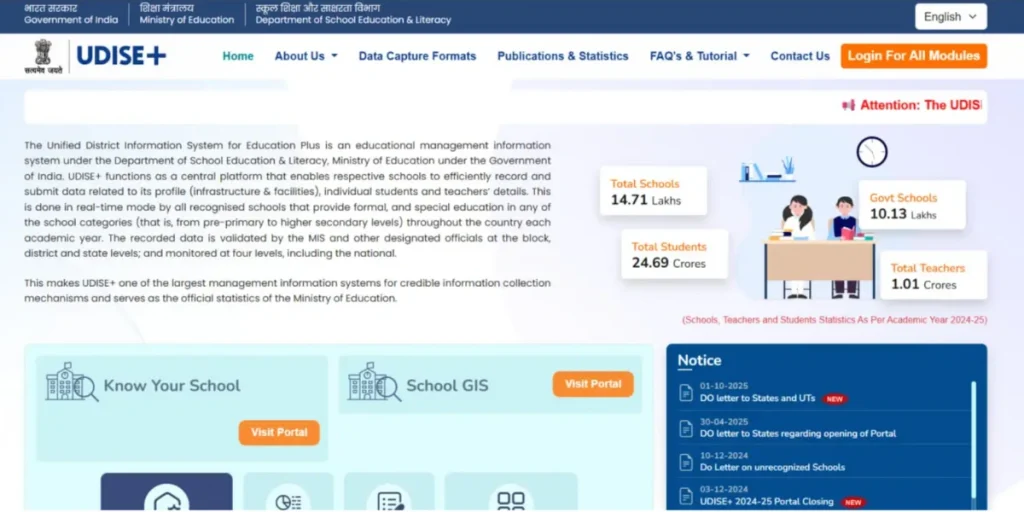
What Is Udise Plus?
UDISE+ is a centralized online data collection system developed by the Ministry of Education, Government of India. It captures comprehensive information about schools, teachers, infrastructure, and students from pre-primary to higher secondary levels.
Among its various sections, the Udise Plus Student Module is designed to record individual student data, making the system more reliable and transparent.
Understanding the Udise Plus Student Module
The Udise Plus allows schools to enter and manage student-wise information instead of only aggregate numbers. This shift from summary data to individual student records helps ensure accuracy and avoids duplication.
Key Objective of the Student Module
- Track enrolment, retention, and dropout trends
- Maintain a unique record for each student
- Support government schemes and benefits
- Enable better monitoring of educational outcomes
Importance of Udise Plus Student Module
The introduction of the Udise Plus Student Module has significantly improved how student data is handled in India’s education system.
Why the Student Module Matters?
- Ensures student-level transparency
- Helps identify out-of-school children
- Supports targeted interventions
- Improves planning at the school, district, and state levels
- Reduces data manipulation and errors
Accurate student data is essential for programs like scholarships, mid-day meals, free textbooks, uniforms, and digital learning initiatives.
Key Features of Udise Plus Student Module
The Udise Plus Student Module comes with several powerful features designed to simplify data entry and verification.
1. Student-Wise Data Collection
Instead of just total numbers, schools must enter details for each student, such as:
- Name of the student
- Gender
- Date of birth
- Category (SC/ST/OBC/General)
- Class and section
- Enrollment status
2. Unique Student Identification
Each student is assigned a unique ID, which helps:
- Prevent duplicate records
- Track students even if they change schools
- Maintain continuity in education data
3. Year-Wise Student Tracking
The Udise Plus Student Module allows tracking of students across academic years. This helps authorities analyse:
- Promotions
- Dropouts
- Transfers
- Retention rates
4. Integration With Other Udise Modules
The student module is linked with:
- School Profile Module
- Teacher Module
- Infrastructure Module
This integration ensures data consistency across the UDISE+ system.
Who Can Access the Udise Plus Student Module?
Access to the Udise Plus Student Module is role-based.
Authorized Users
- School Head / Principal
- Designated Data Entry Operator
- Block and District Education Officers (for verification)
Each user has specific permissions to add, edit, verify, or approve student records.
How to Access Udise Plus Student Module?
Schools must log in to the UDISE+ portal using their credentials to access the student module.
Basic Steps to Access
- Visit the official UDISE+ portal https://udiseplus.gov.in/#/en/home
- Log in using UDISE school code and password
- Navigate to the Student Module from the dashboard
- Select the relevant academic year
Once logged in, schools can begin managing student data.
Data Entry Process in Udise Plus Student Module
Accurate data entry is essential for the success of the Udise Plus Student Module.
Step-by-Step Student Data Entry
Step 1: Select Academic Year
Choose the correct academic year for which data is being entered.
Step 2: Add New Student
Enter basic student details such as name, class, gender, and date of birth.
Step 3: Verify Student Information
Ensure details match school records, like admission registers.
Step 4: Save and Submit
After reviewing the entries, save and submit the data for verification.
Types of Student Information Collected
The Udise Plus Student Module collects multiple categories of data.
Personal Details
- Student name
- Gender
- Date of birth
- Social category
Academic Details
- Class and section
- Medium of instruction
- Enrollment type (new admission, promoted, transferred)
Status Information
- Active
- Promoted
- Dropped out
- Transferred
This structured data helps build a complete student profile.
Mid-Content Focus: Role of Udise Plus Student Module in Educational Planning
In the middle of the data lifecycle, the Udise Plus Student Module acts as a backbone for educational planning and decision-making. Policymakers rely on student-level data to allocate funds, recruit teachers, and design schemes tailored to actual needs.
For example, accurate enrollment figures help determine:
- Classroom requirements
- Teacher-student ratios
- Infrastructure upgrades
Without the Udise Plus Student Module, such planning would be based on estimates rather than verified data.
Verification and Approval Process
Once schools submit student data, it goes through multiple verification stages.
Levels of Verification
- School Level Review
- Block Level Verification
- District Level Approval
Only after approval is the data considered final and official.
Common Errors in Udise Plus Student Module
Despite its structured design, errors can occur during data entry.
Frequent Mistakes
- Duplicate student entries
- Incorrect date of birth
- Wrong class or section mapping
- Mismatch in category or gender
These errors can affect reports and government benefits.
Best Practices for Using Udise Plus Student Module
To maintain accuracy and compliance, schools should follow best practices.
Recommended Guidelines
- Verify admission registers before data entry
- Avoid last-minute submissions
- Regularly update the transferred or dropped-out students
- Double-check entries before final submission
Following these steps ensures reliable data in the Udise Plus Student Module.
Benefits of Udise Plus Student Module for Schools
The student module offers several advantages to schools and administrators.
Key Benefits
- Simplified record management
- Improved transparency
- Better monitoring of student progress
- Reduced paperwork
- Easy access to reports
Schools can also generate student-wise and class-wise reports directly from the portal.
Role of Udise Plus Student Module in Government Schemes
Many government education schemes rely on data from the Udise Plus Student Module.
Supported Schemes
- Scholarships
- Free textbooks and uniforms
- Mid-Day Meal Scheme
- Digital learning initiatives
Accurate student data ensures that benefits reach the right students at the right time.
Reports Generated From Udise Plus Student Module
The system automatically generates analytical reports.
Types of Reports
- Enrollment reports
- Gender-wise data
- Category-wise distribution
- Dropout and retention analysis
These reports help education departments monitor progress and identify gaps.
Challenges Faced by Schools
While the Udise Plus Student Module is highly beneficial, schools may face some challenges.
Common Challenges
- Limited technical knowledge
- Internet connectivity issues
- Large volume of data
- Time constraints
Regular training and proper planning can overcome these difficulties.
Future Scope of Udise Plus Student Module
The Udise Plus Student Module is continuously evolving.
Expected Enhancements
- Better integration with national education databases
- Advanced analytics and dashboards
- Improved user interface
- Real-time data validation
Frequently Asked Questions (FAQs)
Who is responsible for entering student details on the portal?
Student information is entered by the school head or an authorized data entry operator using official login credentials.
Can student information be edited after submission?
Yes, data can be edited during the correction window or before final approval by higher authorities.
What documents are needed while updating student records?
Admission registers, attendance records, and transfer certificates are commonly used for verification.
How is duplicate student data avoided in the system?
The system assigns a unique identification number to each student, preventing repeated or overlapping entries.
Why is accurate student data important for schools?
Correct data helps ensure proper planning, reporting, and delivery of government education benefits.